
Primeiro de tudo precisamos saber se o agente do zabbix está instalado no servidor de banco de dados, para isso execute os comandos abaixo:
Verificar se existe o agente do zabbix instalado, Pesquise:
rpm -qa | grep zabbix
*Se retornar vazio o agente do zabbix não está instalado no servidor
Se tiver vazio instale o agente do zabbix com o comando abaixo:
sudo yum install zabbix-agent
Ativar o agente do zabbix no Linux
sudo systemctl enable zabbix-agent
Iniciar o serviço
sudo systemctl start zabbix-agent
Verificar o status do agente do zabbix
sudo systemctl status zabbix-agent
Depois de validado que o agente do zabbix está instalado e ativo, vamos precisar alterar os arquivo de configuração/etc/zabbix/zabbix_agentd.conf
Edite:
Server= <IP do Servidor Zabbix>
ServerActive= <IP do Servidor Zabbix>
Hostname= <Nome do Servidor Zabbix>
Permitir execução de scripts SQL
Para rodar consultas Oracle, use um script que execute SQL via sqlplus.
Configure parâmetro para UserParameter, exemplo:
UserParameter=oracle.tablespace.size,/path/to/scripts/tablespace_size.sh
e
UserParameter=oracle.tablespace.discovery,/oracle/script/tablespace_discovery.sh
*tablespace_size.sh é o nome do arquivo (pode criar qualquer nome)
cole no final do arquivo /etc/zabbix/zabbix_agentd.conf
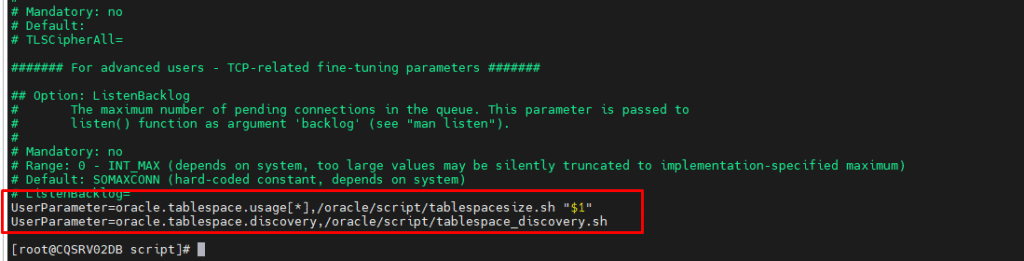
Reinicie o agente
sudo systemctl restart zabbix-agent
sudo systemctl enable zabbix-agent
_________________________________________________________________________________________________________
Criar script para consulta de tablespaces no Oracle
#!/bin/bash
#Configuração Oracle
ORACLE_SID=cdbtst
ORACLE_HOME=/oracle/orabase/product/19.3/db_p1
PATH=$ORACLE_HOME/bin:$PATH
export ORACLE_SID ORACLE_HOME PATH
#Credenciais Oracle
USER=”zabbix2″
PASS=”ZabbixSenha123″
#Tablespace a ser consultada
tablespace=$1
#Executar consulta SQL com conexão explícita e capturar resultado
result=$($ORACLE_HOME/bin/sqlplus -s /nolog <<EOF
connect $USER/$PASS@//localhost:1521/DBTST
set pagesize 0 feedback off verify off heading off echo off
SELECT ROUND((df.totalspace – fs.freespace) / df.totalspace * 100, 2)
FROM
(SELECT tablespace_name, SUM(bytes) / 1024 / 1024 AS freespace
FROM dba_free_space
GROUP BY tablespace_name) fs,
(SELECT tablespace_name, SUM(bytes) / 1024 / 1024 AS totalspace
FROM dba_data_files
GROUP BY tablespace_name) df
WHERE df.tablespace_name = fs.tablespace_name
AND df.tablespace_name = UPPER(‘$tablespace’);
EOF
)
#Exibir resultado limpo, removendo espaços e quebras de linha
echo “$result” | tr -d ‘[:space:]’ | sed ‘/^$/d’
_________________________________________________________________________________________________________
Criar script para descoberta de todas as tablespaces
#!/bin/bash
ORACLE_HOME=/oracle/orabase/product/19.3/db_p1
PATH=$ORACLE_HOME/bin:$PATH
export ORACLE_SID ORACLE_HOME PATH
USER=”zabbix2″
PASS=”ZabbixSenha123″
echo -n ‘{“data”:[‘
first=true
tablespaces=$($ORACLE_HOME/bin/sqlplus -s /nolog <<EOF
connect $USER/$PASS@//localhost:1521/DBTST
set pagesize 0 feedback off verify off heading off echo off
SELECT tablespace_name FROM dba_tablespaces;
EOF
)
for tbs in $tablespaces; do
if [ “$first” = true ]; then
first=false
else
echo -n ‘,’
fi
echo -n “{\”{#TABLESPACE}\”:\”$tbs\”}”
done
echo ‘]}’
__________________________________________________________________________________________________________
Ajuste user/password@localhost para o seu usuário Oracle com permissões.
Torne o script executável:
chmod +x /path/to/scripts/tablespace_size.sh